 Image 1 of 3
 Image 2 of 3
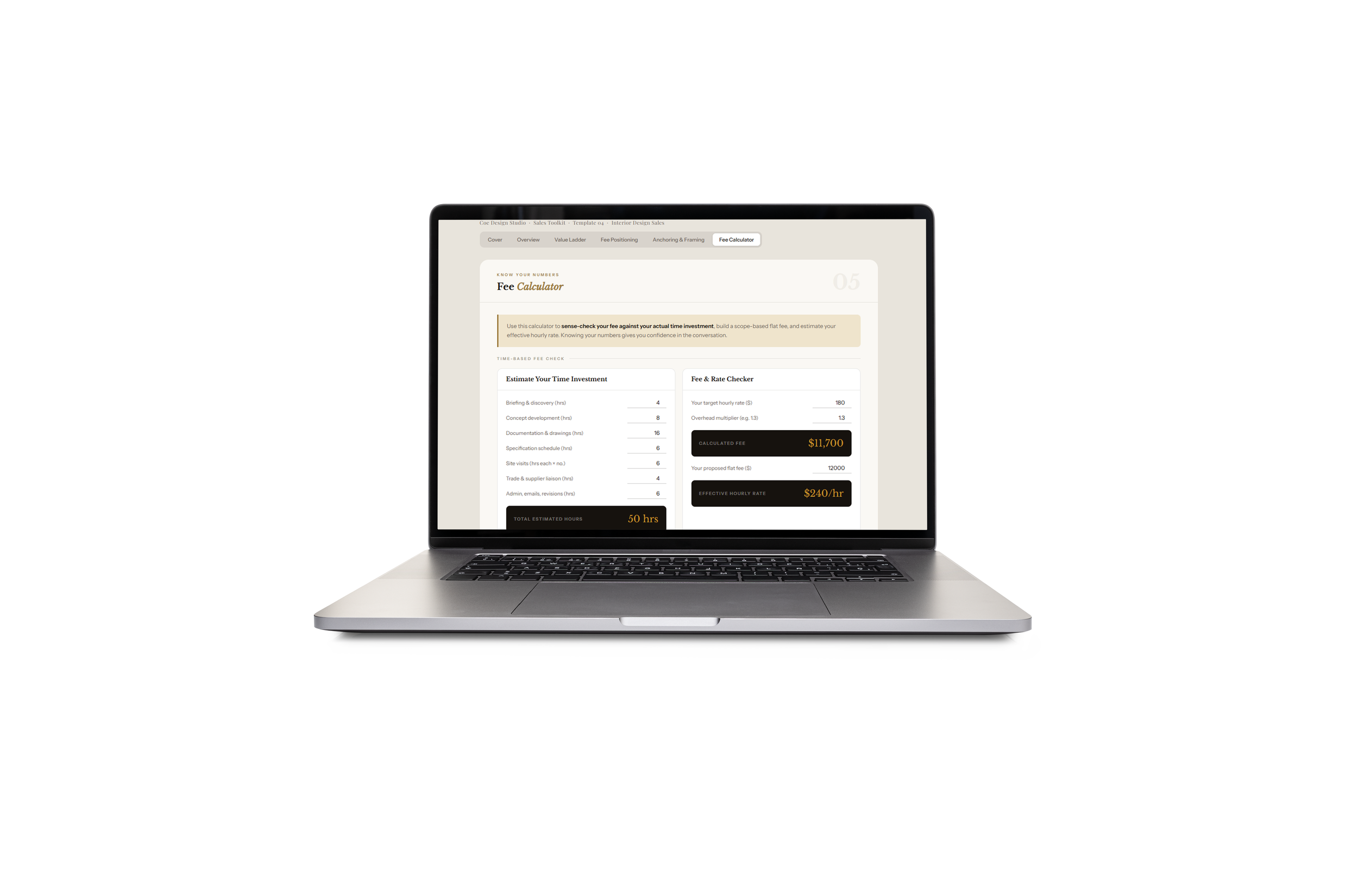 Image 3 of 3
This downloadable HTML file — with a live fee calculator built in — helps you structure your services into a clear value ladder, talk about price with confidence, and stop leaving money on the table by underpricing or discounting.
Purpose
Build a tiered service offer that gives clients a clear choice — and guides them toward the right engagement level.
Replace hourly rate conversations with outcome-based, value-led pricing language.
Give you the scripts and anchoring techniques to present your fee as a signal of expertise, not a number to defend.
Help you calculate fees accurately so your pricing reflects your true cost of delivery, not a guess.
What's included
The three core positioning principles: Anchor High First, Contrast Don't Discount, Name the Value Not the Hours — each with applied examples for interior design contexts.
A fillable four-tier Value Ladder:
Entry (Discovery / Consultation)
Core (Full Design Service — highlighted as most popular)
Premium (Design + Project Management)
VIP / White Glove (Fully Concierge)
Pre-populated suggested inclusions for each tier, with editable fields for your names, fees, deliverables, and ideal client for each level.
Fee Positioning Scripts for three critical moments: before you name the number (value frame first), presenting two or three tiers (the option-shift technique), and after naming the fee (silence and confident bridging language).
An Anchoring & Framing table — five anchoring techniques with starter examples and editable "your version" fields, plus a value language swap table contrasting commodity language with expert language.
A live Fee Calculator: enter estimated hours per phase, your target rate, and an overhead multiplier — it calculates your recommended fee. Enter your proposed flat fee — it shows your effective hourly rate. Includes a scope-based fee builder with inclusions and add-ons.
How it helps you win
Anchors client expectations before price appears: the right opening moves the conversation from "how much?" to "which option is right for us?"
Eliminates the hourly rate trap: tiered, outcome-based pricing is harder to compare and easier to justify.
Gives you language for the most uncomfortable moment in sales — naming your fee — with confidence and no over-explaining.
Increases average project value: a clearly articulated premium tier upgrades clients who are ready for it.
Improves fee accuracy: the calculator catches underquoting before it locks you into a margin-destroying engagement.
Who this is for
Interior designers who discount under pressure or feel uncertain when a client questions their fee.
Designers moving from hourly billing to project-based or value-based pricing.
Studio owners who want a structured, consistent way to present service options and pricing across every enquiry.
How to use
Start with the Overview tab — internalise the three positioning principles before building your ladder.
Complete your Value Ladder — name each tier, set fees, and define inclusions for each level.
Rehearse the Fee Positioning Scripts until they feel natural in your voice.
Use the Fee Calculator when scoping a project to check your fee before it goes in the proposal.
Deliverable details
File type: single downloadable HTML file — includes a live JavaScript fee calculator, no external tools needed.
No external dependencies: all styling and scripts are embedded so it works offline.
Editable: fillable fields throughout; customise tier names, fees, inclusions, and scripts for your studio.
Why this matters
Most interior designers undercharge not because of market conditions, but because they don't have a structured way to present value before they name a number. This template changes that — giving you a tiered offer, the right language, and the confidence to charge what your work is worth.
This downloadable HTML file — with a live fee calculator built in — helps you structure your services into a clear value ladder, talk about price with confidence, and stop leaving money on the table by underpricing or discounting.
Purpose
Build a tiered service offer that gives clients a clear choice — and guides them toward the right engagement level.
Replace hourly rate conversations with outcome-based, value-led pricing language.
Give you the scripts and anchoring techniques to present your fee as a signal of expertise, not a number to defend.
Help you calculate fees accurately so your pricing reflects your true cost of delivery, not a guess.
What's included
The three core positioning principles: Anchor High First, Contrast Don't Discount, Name the Value Not the Hours — each with applied examples for interior design contexts.
A fillable four-tier Value Ladder:
Entry (Discovery / Consultation)
Core (Full Design Service — highlighted as most popular)
Premium (Design + Project Management)
VIP / White Glove (Fully Concierge)
Pre-populated suggested inclusions for each tier, with editable fields for your names, fees, deliverables, and ideal client for each level.
Fee Positioning Scripts for three critical moments: before you name the number (value frame first), presenting two or three tiers (the option-shift technique), and after naming the fee (silence and confident bridging language).
An Anchoring & Framing table — five anchoring techniques with starter examples and editable "your version" fields, plus a value language swap table contrasting commodity language with expert language.
A live Fee Calculator: enter estimated hours per phase, your target rate, and an overhead multiplier — it calculates your recommended fee. Enter your proposed flat fee — it shows your effective hourly rate. Includes a scope-based fee builder with inclusions and add-ons.
How it helps you win
Anchors client expectations before price appears: the right opening moves the conversation from "how much?" to "which option is right for us?"
Eliminates the hourly rate trap: tiered, outcome-based pricing is harder to compare and easier to justify.
Gives you language for the most uncomfortable moment in sales — naming your fee — with confidence and no over-explaining.
Increases average project value: a clearly articulated premium tier upgrades clients who are ready for it.
Improves fee accuracy: the calculator catches underquoting before it locks you into a margin-destroying engagement.
Who this is for
Interior designers who discount under pressure or feel uncertain when a client questions their fee.
Designers moving from hourly billing to project-based or value-based pricing.
Studio owners who want a structured, consistent way to present service options and pricing across every enquiry.
How to use
Start with the Overview tab — internalise the three positioning principles before building your ladder.
Complete your Value Ladder — name each tier, set fees, and define inclusions for each level.
Rehearse the Fee Positioning Scripts until they feel natural in your voice.
Use the Fee Calculator when scoping a project to check your fee before it goes in the proposal.
Deliverable details
File type: single downloadable HTML file — includes a live JavaScript fee calculator, no external tools needed.
No external dependencies: all styling and scripts are embedded so it works offline.
Editable: fillable fields throughout; customise tier names, fees, inclusions, and scripts for your studio.
Why this matters
Most interior designers undercharge not because of market conditions, but because they don't have a structured way to present value before they name a number. This template changes that — giving you a tiered offer, the right language, and the confidence to charge what your work is worth.